I am absolutely furious with Google’s changes to gmail. I don’t really care about the design. The themes allow you enough scope to personalise. The problem is a technical one that has screwed up usability. It’s fundamental, and is the use of multiple iFrames.
What these iFrames do is create scrollbars within scrollbars, especially if you use labels and gadgets in your gmail (which I do).
Gadgets are used to be an easy way of seeing other things like your calendar or Google docs without leaving your email – a nifty productivity bonus. Labels are pretty fundamental to using gmail. Now they have become a nightmare.
This is because everything is in it’s own scrollable area – the mail and left nav are not connected any more, but essentially on their own. Things expand and contract when you hover over, but that’s a recipe for disaster as you have to guess what’s going to be clickable.
So what happens? Here’s a screenshot
First view is ok-ish:

click for full view
Mouseover the labels: not good – an internal scrollbar. Getting to hidden labels is really tricky, as you have to scroll down down down and then click on More – and you get lost the whole time. It used to be one click.
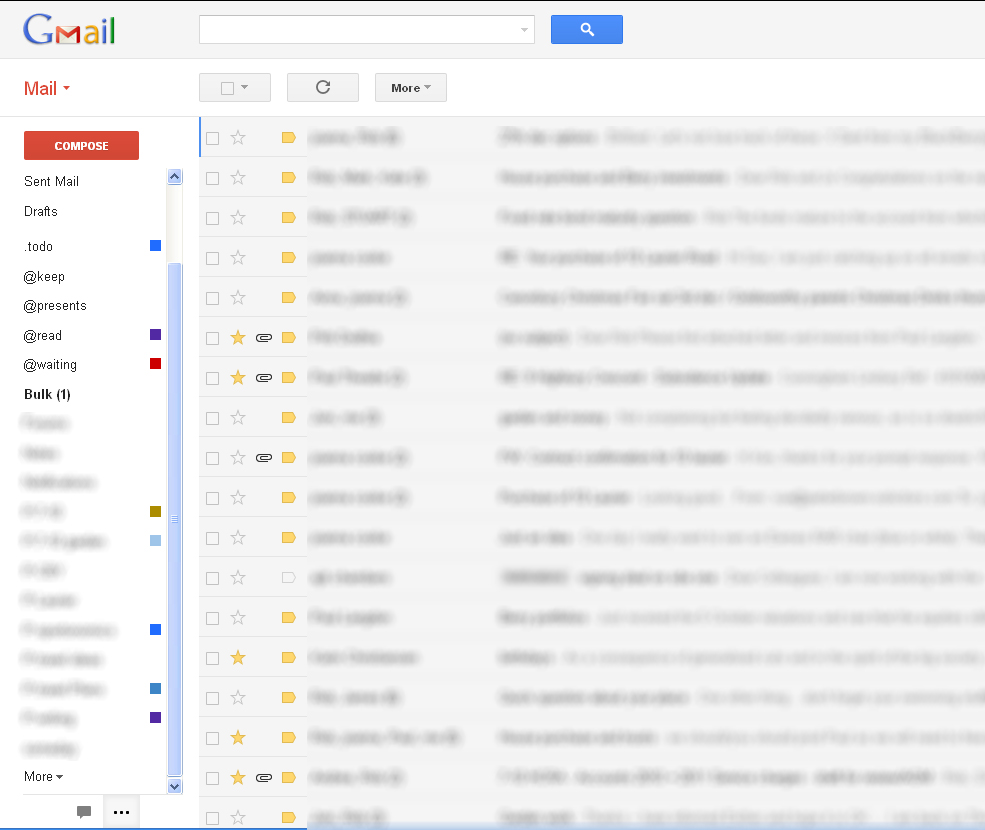
Click for full view
But even worse is in store. Mouseover the google calendar widget – AWFUL: TWO internal scrollbars. One for the calendar (acceptable) the other for the gadgets area. Useless.
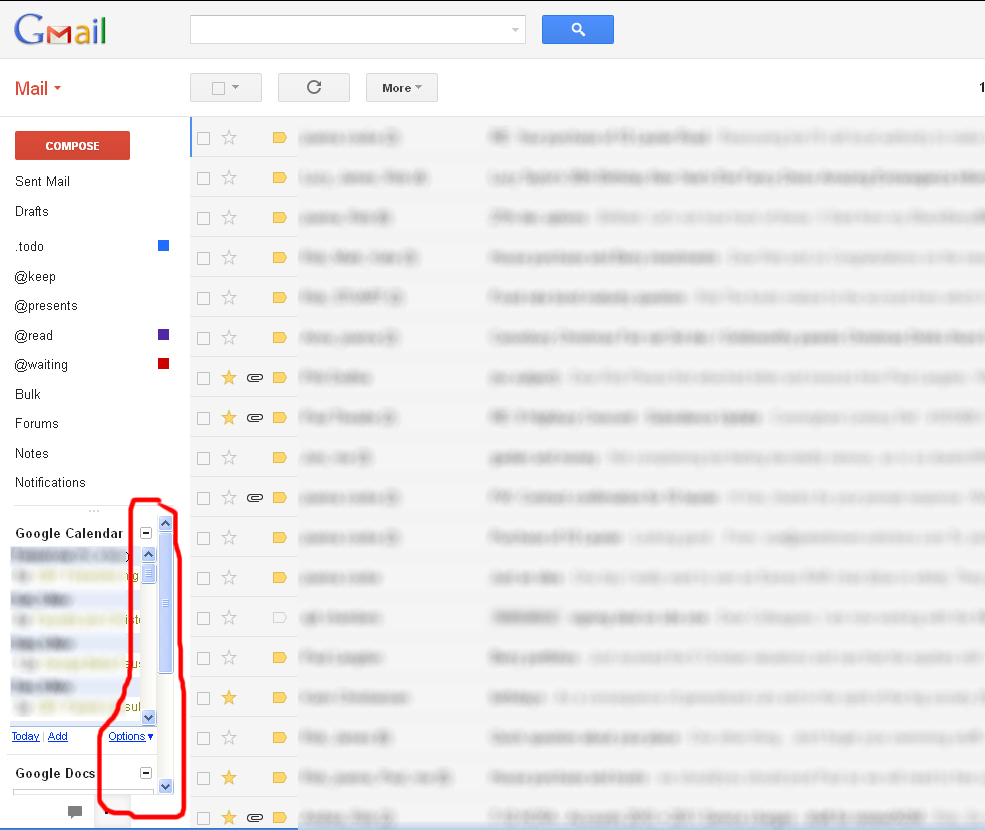
Click for full view
This is the worst “improvement” I can remember to any Google product. It should be scrapped. I’ve now disabled gadgets, because they were so hard to use, which is a step backwards.


At least you HAVE a calendar widget, I’m still trying to get mine back after the change!
(Yeah, Gadget I know) … anyway. I don’t have scrollbars in Chrome, and I only get the Navigation, Labels and Chat – Quick Links and Calendar are gone (but show if I revert to the old interface).
What browser are you using ?
I use a Firefox mainly, but Chrome and Safari too. I’ve killed off all my gadgets because they were so hard to use. I think that’s a pity. I’ve switched back to the old look as well, but it’s a stay of execution…
Well try as I might, I cannot get the calendar gadget back. The control at the bottom of the chat frame which is supposed to toggle between chat and gadgets does not. Help says I can switch off chat by going to the Chat tab in settings – I see nowhere to switch it off. I’ve been on GMail since day one (well public day one) and this is the worst change so far. Too much white in the regular message UI (hard on the eyes) unnecessary transparent ‘title’ between the message panels – and therefore invisible counts against the themed background. Just not an improvement … big shame.
Well I have the gadgets working today. Same control which did not show them yesterday (despite Chrome restarts) is working today … go figure.
Also have the double-scrollbar for the calendar gadget – ugly! The auto-expansion of the labels (coupled with a large screen) means it is not drawing a scrollbar for the labels – though frankly I’d prefer that to the auto-expansions which happens as you mouse breezes over that part of the screen (for example to get to another window to the left of the browser). Really do NOT like that feature.
Have yet to find any redeeming changes – all change for changes sake as far as I can tell. As for minimalist icons instead of text – that’s likely to reduce the use of extended functionality I suspect … but obviously is more friendly to those whose first-language is not supported by GMail (can’t imagine that’s a large demographic).
it is hard to even figure out how to compose a new email message with this thing. garbage!
I pretty well agree with all the comments above. Gmail’s interface just gets worse and worse.
It always was pretty tricky to use as similar features were scattered all over the interface, some on buttons and some in droplists, and the way it groups emails into conversations is a reasonable sort of idea, but implemented apallingly as you end up with an all or nothing approach to handling the conversation, which loses the granularity that should be implicit with them being separate emails.
They insist on using non-standard naming for things too! Compose? Why isn’t this just Create or New like everyone expects it to be? If I want to compose I’ll use a piano and manuscript paper as God and Beethoven intended!
None of these problems have ever been addressed – they’ve just built on that providing us with ever more impenetrable front ends that hide the few things we had finally located in the previous version.
Look Google: Gmail exists to provide email for us and a revenue stream for you. Social Notworking and other crud has no place in an email client. If I want to waste my time messaging and tweeting and U-bending etc then I’ll use the clients for those things – I don’t want them in my email app!
I totally agree with this article. I can’t find anything I want now. Too many buttons everywhere… what do they even mean? Clutter everywhere in the top right corner. Can’t even find how to sign out. Shouldn’t it be just a simple “Sign Out” in words? Or “Settings” in words? They over complicated this. I’ve stopped using gmail even though they have a huge inbox.
It’s just gross.
Is there a link on the bottom of the email to unsubscribe?